
PRESENTER PORTAL
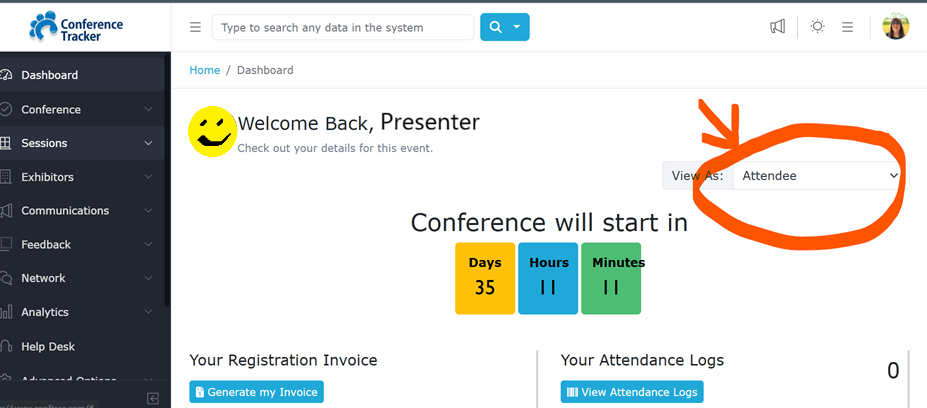
All lead presenters are automatically added as Attendees in Conference Tracker, and you should have received an email from “conftrac” inviting you to login and update your profile. Please login to the portal to add your picture, bio, and handouts. If you login on a desktop you will automatically land in the “Attendee” portal and will need to change to the “Presenter” portal. This is done by selecting “Presenter” from the “View As:” drop down.
From the Presenter Portal you can see the sessions you are presenting – along with details for date, time, and location. In addition you will be able to see your evaluation results as they are completed!
You may also upload handouts in this portal using the “Shared Resources” button.
SESSION SCHEDULE
When you login to the Presenter Portal – you will see all of the sessions you are presenting in. In the conference app, you will need to select presenters, find your name and click on it to see your sessions.
HANDOUTS
All handouts will be loaded into the Conference App through your Speaker Portal in Conference Tracker. All Presenters have been entered into Conference Tracker and should have received an email to Login and create a profile. Once you receive the notification from Conference Tracker that you have been added as a presenter, you will be able to do this yourself. CLICK HERE FOR INSTRUCTIONS ABOUT UPLOADING HANDOUTS IN THE PRESENTER WEB PORTAL. If you are unable to, please EMAIL US HERE.
No printed handouts will be distributed by VAAEYC. If you require printed handouts, please bring them for your session.
INTERNET
The convention center public network “Choose Hampton” will be available, but there will not be dedicated wifi in the breakout or general session rooms. Please download anything that you will need for your presentation and be sure to embed any video files into your presentation and save the files locally, either to a USB or on your laptop, with your presentation. If you need help please EMAIL US HERE.
AUDIO-VISUAL
Please note that all session rooms will be set with a projector and screen. Please bring your laptop, along with any adapters you will need to connect to the projector. If you are unable to provide a laptop, please contact us ASAP HERE.
Sound is not provided in session rooms unless otherwise noted below. If you require sound for your presentation, please bring a portable speaker that can connect to the laptop.
Sound is only provided in the following rooms: UPDATE
- 106
- 107
- 108
- 109
SOCIAL WALL
Another valuable tool the web portal offers for connecting with your audience is the Social Wall feature. To access the conference-wide Social Wall, from your dashboard click “Social Wall” under the conference logo in the right sidebar. To interact with your session’s audience specifically, first click on your session title, located under “Your Sessions”, and then click “Social Wall” in the right sidebar. Share handouts, ask engaging questions, and respond to feedback!
CONFERENCE APP
DOWNLOAD THE CONFERENCE TRACKER ATTENDEE APP HERE
The Conference App is the tool all attendees will use at the Conference to find sessions, complete evaluations, network, chat, and more. All presenters are given access to the Conference App.
Toggle between the Attendee Portal and the Presenter Portal by clicking the drop down box shown in the image below.
CHECK-IN ONSITE
When you arrive at the Hampton Roads Convention Center, please proceed to the Registration Desk to check in. Here you will pick up your name badge and will be checked in. You will then be directed to the location of your session room.
PRESENTER LOUNGE
We have set aside a quiet room for you to relax, grab a light snack or bottle of water, and prepare for your session. This is room is 105, located on the first floor of the HRCC.
ROOM MONITORS
Each session will have a volunteer who will scan attendees in and out of the session, and they can also assist you with getting additional technical help if needed.
If you have NOT received a separate email from Conference Tracker, know of another presenter/co-presenter who hasn’t, or are experiencing technical difficulties, let us know! Email us here.
If you are also an attendee or an exhibitor, see our Attendee and Exhibitor pages for more info!